
Redeem Dan FFA Codes
Cart icon, Inventory, Enter Code Here — plus why pass-gated strings still fail.
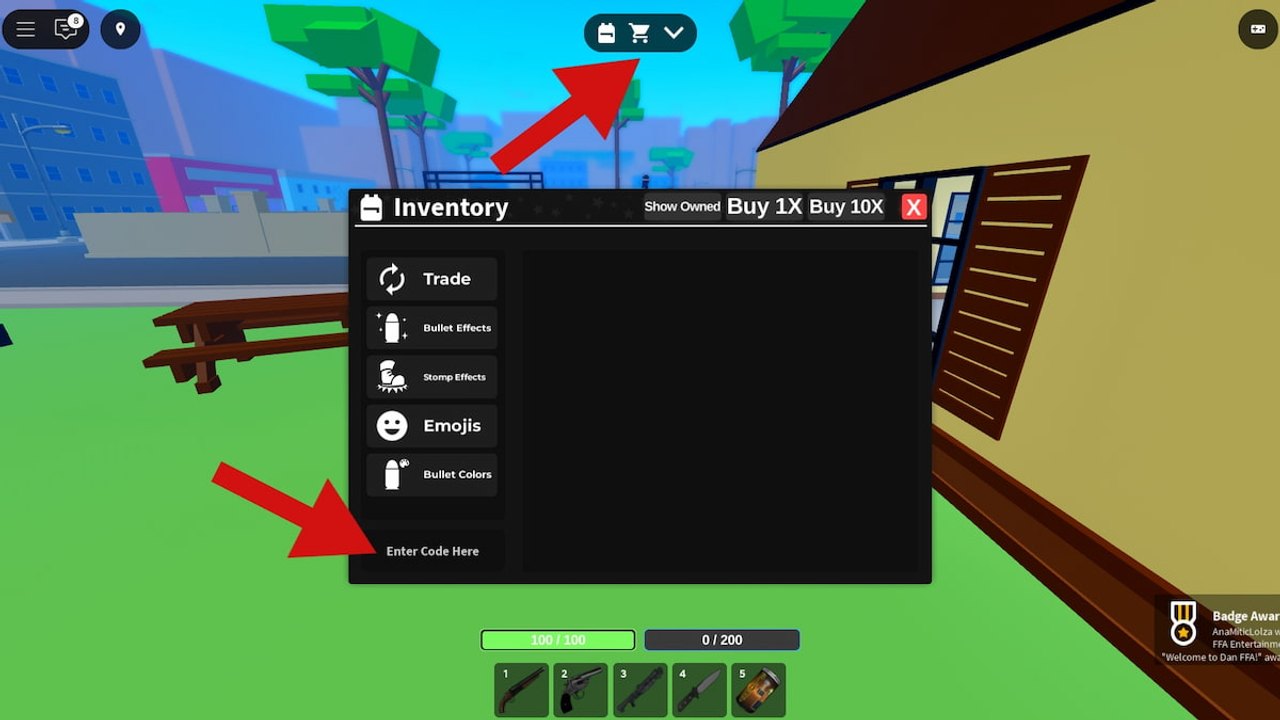
Redeeming a Dan FFA code is a shop action, not a chat command and not a Discord bot. The experience has been live on Roblox since June 28, 2025. You join a 30-player free-for-all, spawn with a shotgun, revolver, and knife, and open the cart at the top of the HUD. This page is the tap-by-tap path. For the live list, use the codes hub. For strings that already died, use expired codes. This fan wiki is not affiliated with Dan FFA Entertainment.
The HUD you care about is the top cart/shop icon (some guides call it a backpack), not the calendar, not the streak list, and not the five weapon slots. Health reads 100/100 unless VIP’s 10% boost applies. Ammo sits on its own bar. None of those widgets accept promo text. If you are still learning the rest of the HUD, pair this page with getting started and controls.
PC redeem steps
- Launch Dan FFA and wait until you can move. You do not need a kill streak first.
- Click the cart icon at the top of the screen. That opens shop and inventory, not the Trade-only slice.
- Open the Inventory view. Tabs you will see include Trade, Bullet Effects, Stomp Effects, Emojis, and Bullet Colors.
- Scroll to the bottom. The field is labeled Enter Code Here.
- Paste one string from the codes hub. Do not add quotes, slashes, or a trailing space.
- Press Enter (or the on-screen confirm, if your UI shows one).
- Watch Inventory, not the ammo bar. Compensation often lands as effects, items, or pass-related goods rather than a new slot-1 shotgun.
Leave the match if you must. Redeeming does not require a raid or a stomp. It also does not pause other players; you are still in FFA, so crouch somewhere dull or redeem between lives.
Mobile redeem steps
Touch servers use the same Inventory box. The difference is chrome: lock, stomp, grab, and sprint sit on the screen, and the cart can hide under that overlay. Close any lock reticle, then tap the cart. If the keyboard covers Enter Code Here, rotate to landscape or dismiss the chat bar, then paste.
Mobile keyboards love to capitalize the first letter or insert a trailing space. Codes are case sensitive. MuscleEditorCompensation is not muscleeditorcompensation. StompCompensationFIXED needs FIXED in that casing. If you pasted from a screenshot, retype the camel case by hand.
Android and iOS both work. You do not need an executor, a PC script, or a mobile script to claim a code. Mixing a redeem with an injected client is how people turn a cosmetic errand into a ban risk.
Pass-gated codes
The active list is almost entirely compensation:
- MuscleEditorCompensation requires the Muscle Editor pass.
- KnifeCompensation requires Spawn Knife.
- AimViewCompensation requires Aim View.
- StompCompensationFIXED requires that you already had Stomps on the old version, not merely that you can press E / DPadDown today.
VIP is a separate Robux product (about 399): medium armor each spawn (high-medium with Auto-Armor), two random foods (four with Auto-Food), set spawn, 10% health, mask. VIP is not refundable and is not typed into Enter Code Here. If you are buying passes to make a code resolve, read gamepasses first so you do not purchase the wrong product.
A failed redeem on a gated string is not proof the codes hub is stale. It often means the gate failed. That is the opposite of an expired launch slogan such as FFA! or V2, which fail for everyone.
Why a code fails
- Typo or spacing. Inventory does not fuzzy-match.
- Wrong casing. Compensation names are camel case plus FIXED on the stomp string.
- Expired string. CharCompensation, FFA!, NEWSKINS!, TRADING, and V2 belong on expired codes.
- Missing pass or missing old stomps. The four “active” rows still need their gates.
- Wrong experience. Paste only inside this Dan FFA place, not a copy, a training-only fan place, or a different battleground.
- Patch lag. After V2 and later updates, a box can reject a string that worked the night before.
- Busy HUD. Firing, stomping, or having the Trade tab focused can make it feel like Enter did nothing. Click the text field until the cursor is in Enter Code Here.
Do not spam five expired slogans in a row. You will only stall your combat round. Check the expired list once, then stop.
After a success
Open Bullet Effects, Stomp Effects, Emojis, and Bullet Colors before you assume the code “did nothing.” Spawn loadout is still shotgun, revolver, and knife unless a pass or purchase changed a slot. Food — hamburgers, tacos, and similar edibles — still restores survivability from the shop or VIP rolls. A code will not rewrite the tier list or hand you a crew tag; tags stay on players and crews.
If you came here from a social post, compare the string to the codes hub before you type it. Random “new code” images recycle NEWSKINS! and TRADING for months. Official destinations stay on the links hub. New drops, when they exist, still tend to land in Discord rather than in a Trello.
Frequently Asked Questions
Quick answers players actually search before they queue another FFA server.
Where is the Enter Code Here box?
Open the top cart icon, switch to Inventory, and scroll to the bottom. It is not on the ammo bar and not in chat.
Is the cart the same as a backpack?
Yes in player slang. The HUD control is the cart/shop icon at the top. Use that, then Inventory, as described above.
Are Dan FFA codes case sensitive?
Yes. Paste MuscleEditorCompensation and StompCompensationFIXED exactly. Mobile auto-capitalization is a common fail.
Can I redeem on a phone?
Yes. Dismiss lock/stomp overlays, open the cart, and paste into Enter Code Here. You do not need a mobile script.
Why does a listed code still fail?
Pass gates, expired slogans, typos, and wrong places all fail the same way. Compare active codes with expired codes and gamepasses.
Will a code give me a better gun?
Not as a loadout cheat. Compensation is pass-related. Guns still come from spawn, the shop, and what you actually hit with — see the weapons tier.