
Mobile Scripts for Dan FFA
Keyless pastes on a touch HUD — lock, stomp, grab, sprint — with the same ban warning.
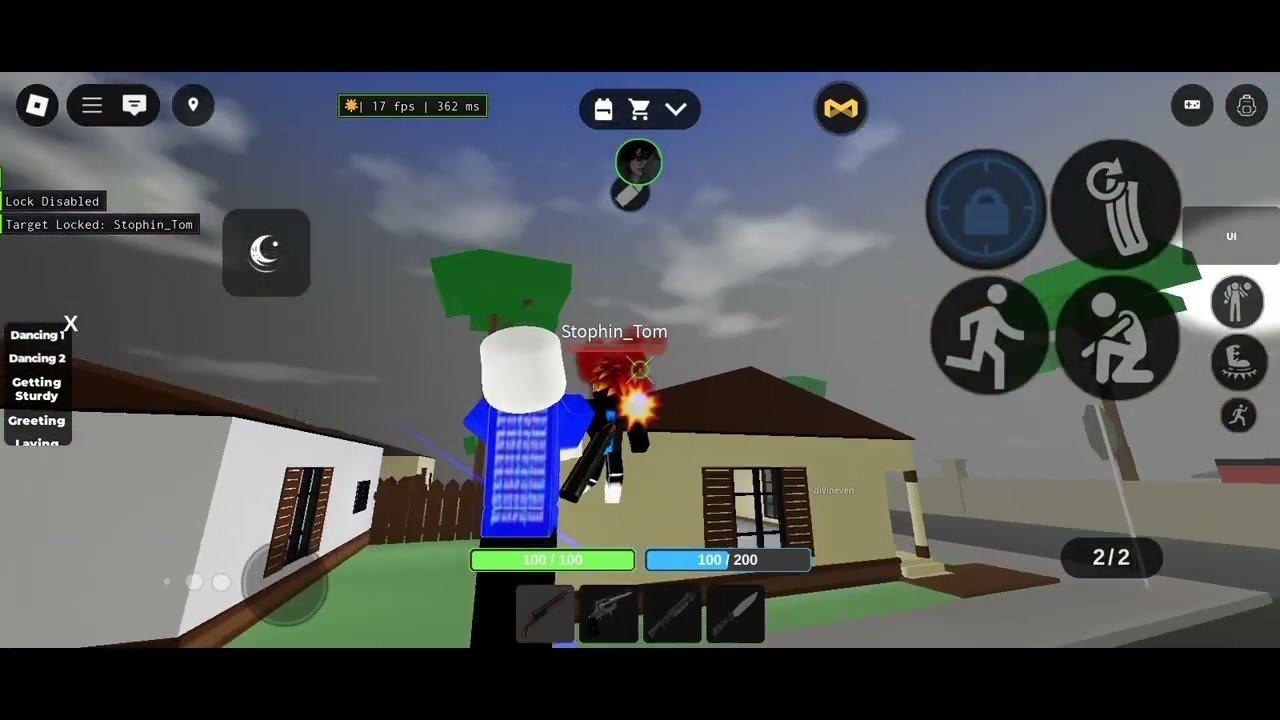
Mobile Dan FFA uses the same 30-player free-for-all as PC, live on Roblox since June 28, 2025, but the HUD is not a keyboard. On-screen controls cover lock, stomp, grab, and sprint. Macro, reload, and crouch still exist through the mobile mapping (DPad / face buttons on a controller; on-screen buttons on a phone). Scripts that demand Q or RightShift were written for PC. This page prefers keyless loadstrings and explains why a touch overlay fights injected UIs. Nothing here is official. Exploiting is a permanent ban. Android/iOS executors can steal accounts just as easily as desktop injectors — often more easily, because people sideload mystery APKs.
If you only need Enter Code Here, you do not want this page. Open the cart, Inventory, redeem on how to redeem, and stay on the codes hub. Mixing a modified client with a compensation code is how a cosmetic errand becomes a ban.
Touch HUD versus script UI
Before you paste anything, know the stock buttons so you can tell them apart from a cheat menu:
- Lock / aim assist chrome on screen (not the same as silent aim).
- Stomp (E / DPadDown on other devices).
- Grab (G / DPadUp).
- Sprint (LeftShift / ButtonL3 on other devices).
- Fire / melee on the shoot button.
- Cart icon at the top for shop and Inventory.
Full bind table: controls. Stomp technique: stomps. If a script draws a second joystick or a FOV circle over sprint, you will mis-tap stomp and feed a clip to the streak list.
Android/iOS executors (the usual mobile injectors, not an ad for a named brand) need a running Dan FFA process, then a paste box. High-level flow: join the experience, attach, paste one keyless block, execute, look for an on-screen menu. If the executor demands a key site login, back out. Key pages are how session tokens leak. This wiki will not recommend a vendor.
Sideloaded Roblox clones are worse than a paste box. A fake client can harvest every pass on the account — VIP, Muscle Editor, Spawn Knife, Aim View — listed on gamepasses. Permanent ban plus a stolen account is a bad pair.
Keyless silent aim
loadstring(game:HttpGet("https://rawscripts.net/raw/Universal-Script-Dan-FFA-silent-aim-op-keyless-100037"))()This is the paste to try first on a phone because it is labeled keyless. Silent aim still will not move your thumbs for you. You must track with the on-screen look control while shots path toward a hitbox. If the script does nothing, it is patched; see updates. Do not “fix” it by pasting the PC bypass on a phone.
Universal AIM ESP hub (if your executor can show a menu)
loadstring(game:HttpGet("https://pastebin.com/raw/XG1m6ktV"))()Reported features: smooth aimbot (head / torso / root), FOV, ESP chams / boxes / health / names, walkspeed, jumppower, fly, noclip, infinite jump. On PC the UI toggle is RightShift. On a phone there may be a tap icon instead, or nothing. If no menu appears, stop; flying with no UI is how you noclip through a raid and screenshot yourself into a report.
Walkspeed and fly are obvious on mobile because other players see you skating past 30-person streets. Crew leaderboards will not protect you. Matches remain FFA.
Other loadstrings, used only if keyless fails
PC silent aim and Q smooth aimbot live on PC scripts. They sometimes run in a mobile executor, but Q has no home on a touch HUD. Do not rebind the game’s Macro button to “maybe Q.” The anti-cheat bypass on the PC page is a worse idea on a phone, where you cannot even see a debug console.
loadstring(game:HttpGet("https://rawscripts.net/raw/Dan-FFA-Silent-Aim-45596"))()Use that only as a fallback, still one paste at a time. Hub context stays on scripts.
What scripts will not do on mobile
They will not grant VIP food rolls, set spawn, or the 10% health boost. They will not rank guns for you — use the tier list and weapons. They will not replace combat or getting started. They will not revive expired codes. They will not turn Flame, Normal, or Aim Trainer into cooperative PvE.
After a scare (unexpected key page, crashed Roblox, password prompt), change your Roblox password on a clean browser, then stay out of injectors. Play legit: cart for shop, hamburgers/tacos for sustain, shotgun/revolver/knife until you buy a slot. Official place, group, and Discord: links hub. PC keybinds and the full five-paste list: PC scripts.
Frequently Asked Questions
Quick answers players actually search before they queue another FFA server.
Which Dan FFA scripts are keyless on mobile?
Start with the keyless silent aim paste on this page. The ESP hub may work if a tap menu appears. Avoid key login pages.
Can I use Q or RightShift on a phone?
Those are PC assumptions. See PC scripts for Q and RightShift. On mobile, look for an on-screen menu or skip the paste.
Are Android/iOS executors safe?
No. They can steal sessions, especially sideloaded clients. This wiki does not recommend a vendor. The game still bans exploiting.
Will a script add lock, stomp, grab, or sprint buttons?
Those buttons are already on the mobile HUD. Scripts overlay extras. Learn stock binds on controls.
What happens if I get banned on mobile?
Exploiting is listed as a permanent ban. Passes on that account stay gone. Play legit via getting started instead.
Do I need a script to redeem codes on a phone?
No. Use the cart → Inventory path on how to redeem. Keep codes and scripts separate.