
Dan FFA Controls
PC, controller, and mobile bindings for fire, Macro, Stomp, Grab, reload, crouch, and sprint.
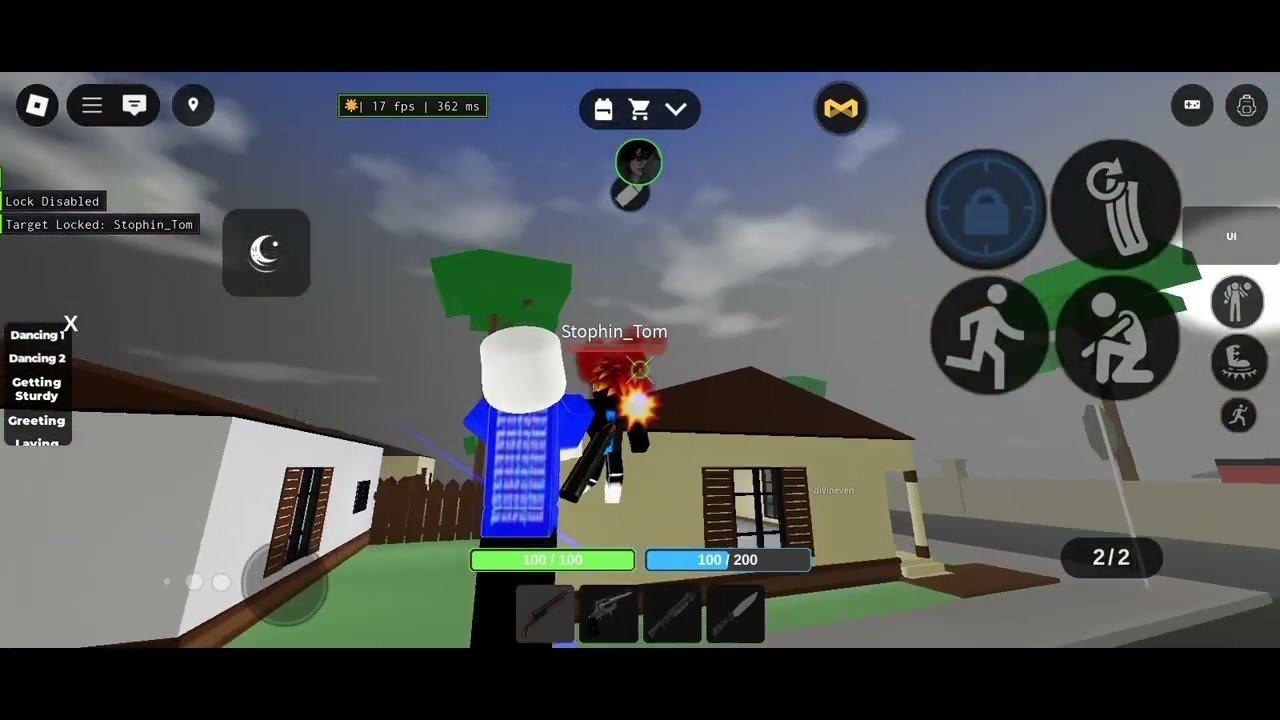
Dan FFA is a 30-player Roblox street FFA, not a cooperative campaign shooter with a hidden tutorial. The official description from Dan FFA Entertainment (iwcozz) lists the same core bindings on every platform: Macro, Stomp, Grab, Reload, Crouch, and Sprint. Fire and melee share the attack input. If you mash the wrong key on a downed body, you lose the stomp, the grab, and often the next life.
Learn these inputs before you buy extra guns. The spawn kit is still shotgun, revolver, and knife. Food sits in slot 5. The HUD shows 100 HP, ammo, five slots, the cart shop, and the streak list. Mobile lock text reads “Lock Disabled” or “Target Locked: name”. That lock is an aim helper, not a separate ability.
PC bindings
| Action | PC |
|---|---|
| Fire or melee | Left click |
| Macro | X |
| Stomp | E |
| Grab | G |
| Reload | R |
| Crouch | Left Ctrl |
| Sprint | Left Shift |
Left click is the entire damage input. Guns fire. Knife swings. Do not look for a separate melee key. Hold X for Macro, the fast skill. Tap E only on a downed player. Tap G after the stomp. Reload with R behind a wall. Crouch at windows. Sprint between houses, then release Shift before you peek so the first shotgun pellet is not a running spray. Eat slot 5 food after the grab, not during the stomp.
Controller bindings
| Action | Controller |
|---|---|
| Macro | DPadRight |
| Stomp | DPadDown |
| Grab | DPadUp |
| Reload | ButtonX |
| Crouch | ButtonB |
| Sprint | ButtonL3 |
The official tips map DPad to the three finish inputs: right is Macro, down is Stomp, up is Grab. If you press DPadDown while the target is still standing, nothing useful happens and you advertise the dive. ButtonX reloads. ButtonB crouches. ButtonL3 sprints. Fire and melee use the standard attack control on your device. Down then up is stomp then grab. Holding DPadRight on a body is a skill, not a finish.
Mobile buttons and lock
Mobile uses on-screen buttons plus an analog stick. You get lock, grab (labeled G on some layouts), stomp, sprint, and crouch. Place lock where your thumb already rests. The lock UI can show “Lock Disabled” or “Target Locked: name”. When a name appears, you are committed to that player. Disable lock when a third party swings from a porch, when you need to stomp a different body, or when you are running food in slot 5.
Do not cover the stomp and grab buttons with the stick. A common mobile death is landing the gunfight, then missing E because the thumb is still dragging lock. If the layout fights you, open settings and shrink the lock widget before you touch the shop. Cosmetics will not fix a covered E key. See Getting Started for the rest of the first-hour HUD.
Macro versus stomp versus grab timing
These three inputs are not interchangeable.
Macro (X / DPadRight) is a held fast skill. Use it when you already have a gunfight, not as a substitute for walking onto a body. Holding Macro while you stand on a downed player is how you get shot in the back.
Stomp (E / DPadDown) is the finish. You must be on the downed player. Too early and the stomp does not count. Too late and another player takes the streak. Streaks feed crew boards. Details and shop Stomp Effects live on How to Stomp and Grab.
Grab (G / DPadUp) takes loot. Grab after the stomp if you want both the streak and the cash. Grabbing first can still pick items up, but it is how you lose the board stat that crews actually track. During a house rush, one player stomps while another watches the door. That split is in How to Raid, not in this table.
Reload (R / ButtonX) is its own trap. Do not reload in a doorway. Swap to knife with left click melee when the mag is dry, then reload behind a wall. The combat guide covers shotgun versus revolver ranges so you stop dumping shells across a street.
Practice order that actually sticks
Join a Normal or Flame server, not Aim Trainer, when you want to feel real timing. Aim Trainer is for tracking. Street FFA is for E and G. Spawn, check 100 HP, and run one loop: shoot, knife if dry, stomp, grab, eat, reload. Then read crews only if you want a tag on the board.
Dan FFA published these tips in the place description. Exploiting, package abusing, and stats boosting still get a permanent ban, so do not look for a script that “auto stomps” while you learn. Scripts is a separate hub with that warning.
VIP does not change the keys. The pass adds spawn armor, food, a set spawn, +10% HP, and a mask. Bindings stay the same. If you want the pass later, use game passes. Rank extra guns on the weapon tier list and loadout ranks after your fingers can hit E then G without looking.
Paste strings in Enter Code Here using working codes and how to redeem. Patch notes belong on Updates. Official links sit on Links. Other walkthroughs start on the Guides Hub. When the table is memorized, go die in a doorway until the stomp lands.
Frequently Asked Questions
Quick answers players actually search before they queue another FFA server.
What is the PC key for stomp, grab, and Macro?
E stomps, G grabs, and X is Macro. Left click fires or swings melee. R reloads, Left Ctrl crouches, and Left Shift sprints.
How do controller DPad bindings map?
DPadRight is Macro, DPadDown is Stomp, and DPadUp is Grab. ButtonX reloads, ButtonB crouches, and ButtonL3 sprints.
How does mobile lock text work?
The lock widget can read "Lock Disabled" or "Target Locked: name". Disable lock when a third party appears or when you need to stomp a different body.
Should I grab before I stomp?
Stomp first if you want the streak that crew boards track, then grab loot. Full finish order is on How to Stomp and Grab.
Does VIP change the control scheme?
No. VIP changes spawn armor, food, spawn location, HP, and a mask. Keys stay the same. See game passes.